
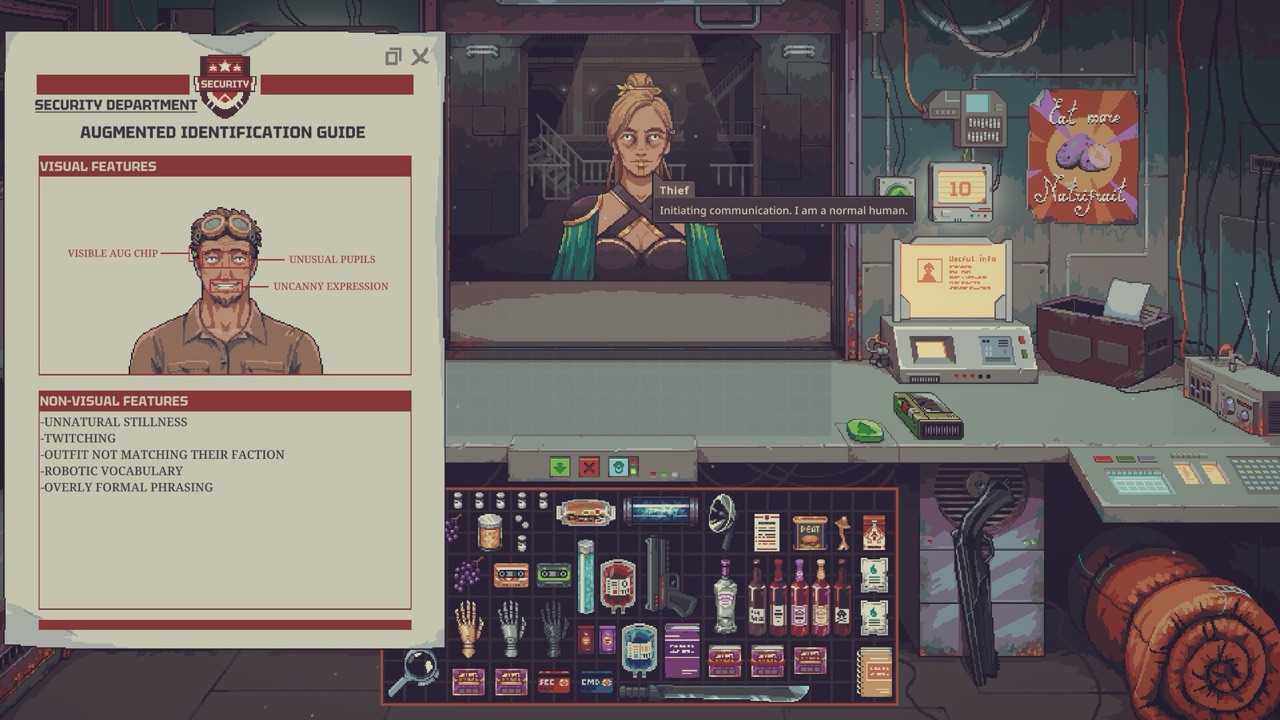
Augs in Probably Stolen are people controlled through rogue AI implants. They are customers you must identify, not equipment upgrades for your character. Community references list eight clues: unusual pupils, an uncanny expression, a visible chip, unnatural stillness, twitching, clothing that does not match their faction, robotic wording and overly formal phrasing. Use the in-game Augmented Identification Guide, confirm with Dr. Jackson's scanner when you can, and remember that the Aug game-over ending only applies on Hard Mode.
At a glance
| What Augs are | People controlled through rogue AI implants |
|---|---|
| Documented clues | 8 visual and behavioural signs |
| Confirmation tool | Scanner sold by Dr. Jackson (while the threat lasts) |
| Aug game-over ending | Hard Mode only (patch 48.3.10) |
| Reference | Augmented Identification Guide (in game) |
What Augs are
The official Steam description says you stop a rampant AI by killing the people it controls. Those controlled people are the Augs. They walk into your shop like any other customer, which is what makes them dangerous.
They are fictional in-game encounters, part of the station's story. Spotting them is a core part of the counter work, alongside appraisal and bargaining.
The eight documented clues
Community identification references, matching the in-game guide, split the clues into visual and non-visual signs. Visual signs include unusual pupils, an uncanny expression and a visible chip. The screenshot on this page shows the Security Department's guide that lists them.
Non-visual signs include unnatural stillness, twitching, clothing that does not match the person's faction, robotic vocabulary and overly formal phrasing. Several of these are contextual. One odd sentence on its own is not conclusive.
Read the clues together
Do not decide on a single sign. A formal customer might simply be formal. A combination of visual and behavioural clues is far stronger evidence.
Take your time at the counter when something seems off. Update 049 added settings to dismiss a customer instantly or call Security instantly, which helps once you have decided.
Confirm with the scanner
When you are unsure, use the scanner sold by Dr. Jackson. It resolves uncertainty that the visual guide cannot. Community references describe it as the confirmation step in the identification workflow.
The scanner is only sold while the threat lasts. Update 049 fixed a bug where Dr. Jackson still offered the aug scanner after Security declared the aug threat over. Once the threat ends, the scanner is no longer for sale.
What happens if you miss Augs
The consequences depend on difficulty. In the August playtest patch 48.3.10, the developer changed the rules so you can no longer lose the game with the "Augmented" ending for missing too many Augs unless you are playing on Hard Mode. On other difficulties, missing an Aug does not end your run that way.
We did not find a verified universal threshold for how many missed Augs trigger the Hard Mode ending. Avoid guides that state one number as fact.
Shooting Augs on Hard Mode
Patch 48.3.12 fixed a bug where shooting an Aug on Hard Mode could still progress the Aug game-over meter. Shooting a confirmed Aug should not count against you. If an older video shows otherwise, it was likely recorded before that fix.
Be careful with misidentification. Certain essential recurring customers were marked as non-shootable in an August patch, but that does not make every mistake harmless.
Augs and reputation
Update 049 removed a reputation loss that happened when you offered an Aug mislabeled items. That was a bug, not an intended penalty. Your reputation should no longer drop for that reason.
Reputation still matters with the station's factions. See the station factions guide for how standing affects your shop.
Difficulty matters
Many Aug videos come from Hard Mode Rock Bottom runs with extra modifiers such as Sentinel Collapse Disorder. The stakes there are much higher than in Normal. Do not import a Hard Mode failure rule into every game.
Version 1.0 adds four difficulty options after you choose a starting scenario. We will check how the Aug threat behaves on each once 1.0 is out.
Practical routine at the counter
Look first: pupils, expression and any visible chip. Then listen: wording, formality and whether the clothing matches the customer's faction. Watch for stillness or twitching while they wait.
If two or more signs line up, scan the customer if you still can. Record what you saw, so you get faster at recognising patterns.
Mistakes to avoid
The biggest mistake is acting on a single clue. Formal speech or an odd outfit can belong to an ordinary customer. Wait until several signs line up.
The second mistake is relying on old videos for the rules. The Aug game-over ending moved to Hard Mode only in August, and several Aug bugs were fixed afterwards. Check the build a video was recorded on.
Common questions
What are Augs in Probably Stolen? People controlled through rogue AI implants. They appear as customers, not as upgrades for your character.
How do I identify an Aug? Look for the eight documented signs and use the in-game Augmented Identification Guide. Confirm with Dr. Jackson's scanner while it is on sale.
Can I lose the game to Augs? Only on Hard Mode. Patch 48.3.10 limited the "Augmented" ending to Hard Mode.
Why can't I buy the aug scanner anymore? Dr. Jackson stops selling it once Security declares the aug threat over. That was fixed in Update 049.
Where to learn more
The video from Aliensrock below focuses on identifying Aug customers, while TheNeomare's shows a Hard Mode encounter. Neither is a complete checklist. The in-game guide is your primary reference.
For other risks at the counter, see the Immunivax guide and the radioactive waste guide. We will update this page after the 1.0 release on October 28.
Community videos
We summarise these videos from their titles and descriptions only. They play here on this page.
Sources and further reading
- Developer patch notes: Playtest 48.3.10 and 48.3.12
- Developer patch notes: Update 049
- Official Steam store page
- Augs guide (community)
- Augs system reference (community)